
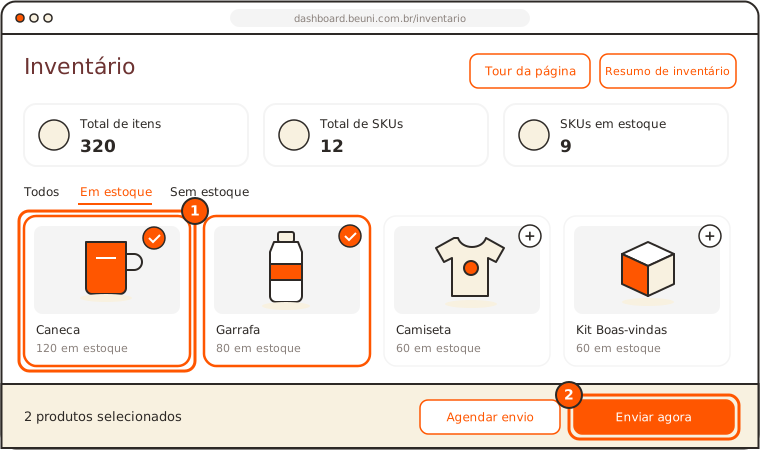
Quick answer: in the Inventário (Inventory), select the products, click Enviar agora (Ship now), choose who it goes to (contacts or spreadsheet) and pay the freight. After payment, the shipment leaves within 72 business hours.
Before you start
- The products must be in your Inventário. Still arriving? See Schedule a shipment.
- Have the list of recipients in your Contacts or in a spreadsheet.
Request the shipment
- In Inventário, click the product and then Adicionar à seleção (Add to selection). Repeat for each product.
- Click Enviar agora.
- Adjust the quantity per recipient for each item.
- In Para quem vai (Who it goes to), choose the people in Meus contatos (My contacts) or upload the Planilha do modelo (Template spreadsheet). You can register someone new right there.
- Click Selecionar frete (Select freight).
- If anything is flagged in the spreadsheet, fix it in the table itself.
- In Configuração de envio (Shipment settings), choose the freight among the quoted options and pay.
The shipment shows in Envios (Shipments) for you to track.
Tip: have a spreadsheet in a different format? Use Transformar minha planilha (Convert my spreadsheet) to match the template, including each person's size.
One person or many
| Recipients | How it goes out |
|---|---|
| 1 person | One shipment |
| Several people | A batch shipment |
| More than 100 people | Prepared in parts of 100, and each part becomes a batch, with its own payment |
| More than 1,000 people | Talk to us through Falar com um especialista (Talk to a specialist) |